How to Apply for Your California Guard Card
After your 8-hour course, apply for your initial Security Guard registration with the Bureau of Security and Investigative Services (BSIS). The fastest way is online through BreEZe, the state's licensing system: register a free account, submit the application and pay the $60 fee, then complete Live Scan fingerprinting.
What You Need Before You Start
Have these ready and the whole application takes about 15 minutes:
- Your Power to Arrest & Appropriate Use of Force certificate (for the serial number and completion date)
- A valid government photo ID and your driver's license number
- Your Social Security Number
- Your current home address and an email you check often
- A credit or debit card for the $60 application fee
Step 1 — Register for BreEZe
Create your free account on BreEZe, the state's online licensing system.
- Go to breeze.ca.gov and click BreEZe Registration under New Users.
- Enter your profile details: legal name, email address, and the User ID you want.
- Check your email. BreEZe sends a message with a temporary password (check your spam or junk folder if it does not arrive).
- Log in for the first time with your User ID and the temporary password.
- Create your own password. You are now registered and can start your Security Guard application.
- VideoStep-by-step walkthrough: creating a BreEZe account
- Use an email you check often. BSIS sends updates there.
- Write down your User ID and password.
- Use your legal name exactly as it appears on your ID.
Step 2 — Submit Your Initial Application (How to Fill Out the BSIS Guard Card Application)
Here's how to fill out the BSIS Security Guard application in BreEZe. Log in at breeze.ca.gov with your User ID and password, then start a new application. You must be at least 18, and your Power to Arrest & Appropriate Use of Force certificate must be dated within the six months before you apply.
- Choose the Bureau of Security and Investigative Services, License Type Security Guard, Application Initial Security Guard Registration.
- Work through each page, entering your personal information and answering every question, then click Next.
- Enter your training in the Powers to Arrest Course Certification section, using your certificate. If you trained with us, enter:
| Field | What to enter |
|---|---|
| Name of Course Instructor | Mario Galvan |
| School or Business Name | Nocturnal Protective Services LLC |
| License Number | 2995 |
| PTA Certificate Serial Number | The serial number on your certificate |
| Training Completion Date | The date on your certificate (mm/dd/yyyy) |
- Upload any supporting documents the application asks for.
- Have your certificate next to you before you start.
- You can save your application and come back to it later.
- Use the same legal name as on your ID and Live Scan form.
Step 3 — Review, Pay, and Save Your Receipt
- Review your answers, then pay the initial application fee (currently $60; check the BSIS fee schedule) by card.
- Save your PDF receipt — it is your proof that you applied.
- Applying online bypasses the BSIS Cashiering Office and can cut processing time by up to two weeks.
Step 4 — Complete Live Scan Fingerprinting (How to Fill Out the Guard Card Live Scan Form)
Here's how to fill out the guard card Live Scan form. Download the official Security Guard Request for Live Scan Service form — using the wrong form is a common cause of delay. You only fill out one part of it.
- Fill out the Applicant Information section only (the highlighted block below). Complete every field, including Social Security Number and Driver's License Number.
- Sign and date the form.
- Leave everything else alone. The top is pre-filled by BSIS, and the bottom is for the Live Scan operator.
- Take the form and your photo ID to a Live Scan location.
- Pay the fee: $49 ($32 DOJ + $17 FBI), plus the provider's rolling fee. Verify current DOJ & FBI fees at oag.ca.gov — amounts can change and the rolling fee varies by provider.
- Keep your copy with the ATI number — it's how you track your fingerprints.
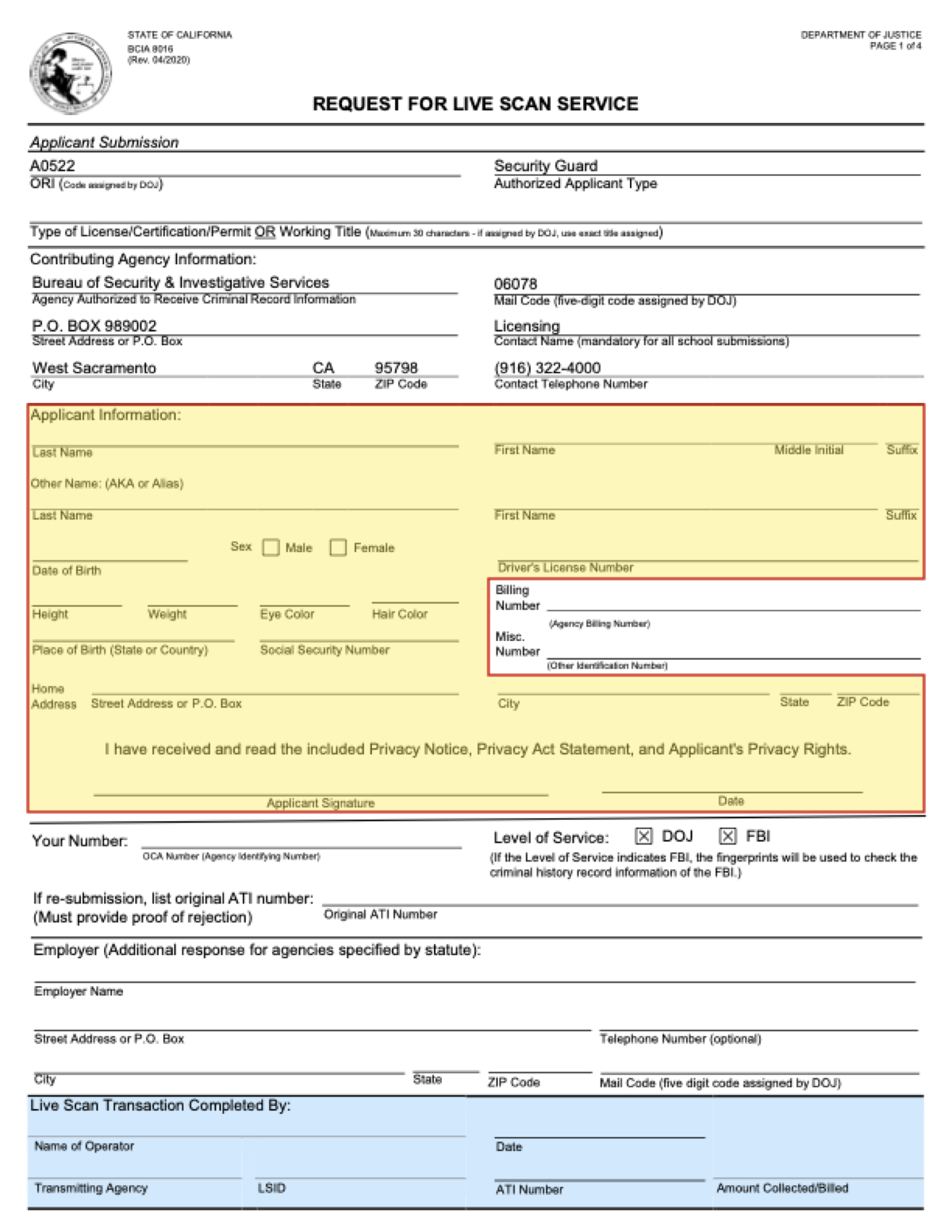
- Billing Number and Misc. Number
- Your Number (OCA)
- Employer
- Re-submission / Original ATI Number (only if earlier prints were rejected)
- Other Name (AKA or Alias): fill in only if you've used another name, such as a maiden name.
- Use the same legal name as on your ID and BreEZe application.
That's it — now you wait to hear back from BSIS. Allow about 4–6 weeks for processing (current timeframes). Check your status anytime on the Verify a License page.
Related Questions
How do I fill out the BSIS guard card application?
How do I fill out the Live Scan form for a guard card?
What do I enter in the Powers to Arrest Course Certification section?
I already have a BreEZe account — or it says I can't register. What do I do?
Where does the ATI number come from on the Live Scan form?
Do I need the 8-hour course before I apply?
What happens after I apply?
Verified against the BSIS Security Guard Registration Fact Sheet. Questions? Contact BSIS at (800) 952-5210 or bsis@dca.ca.gov.
Need Your 8-Hour Certificate First?
Same-day certificate, plus a printed guide to every step of the application.
Book the 8-Hour Course — $80